How I Stopped Babysitting Claude Code
The terminal multiplexer, fish functions, context tools, and agent skills I ended up building so AI work could keep running while I wasn't watching.
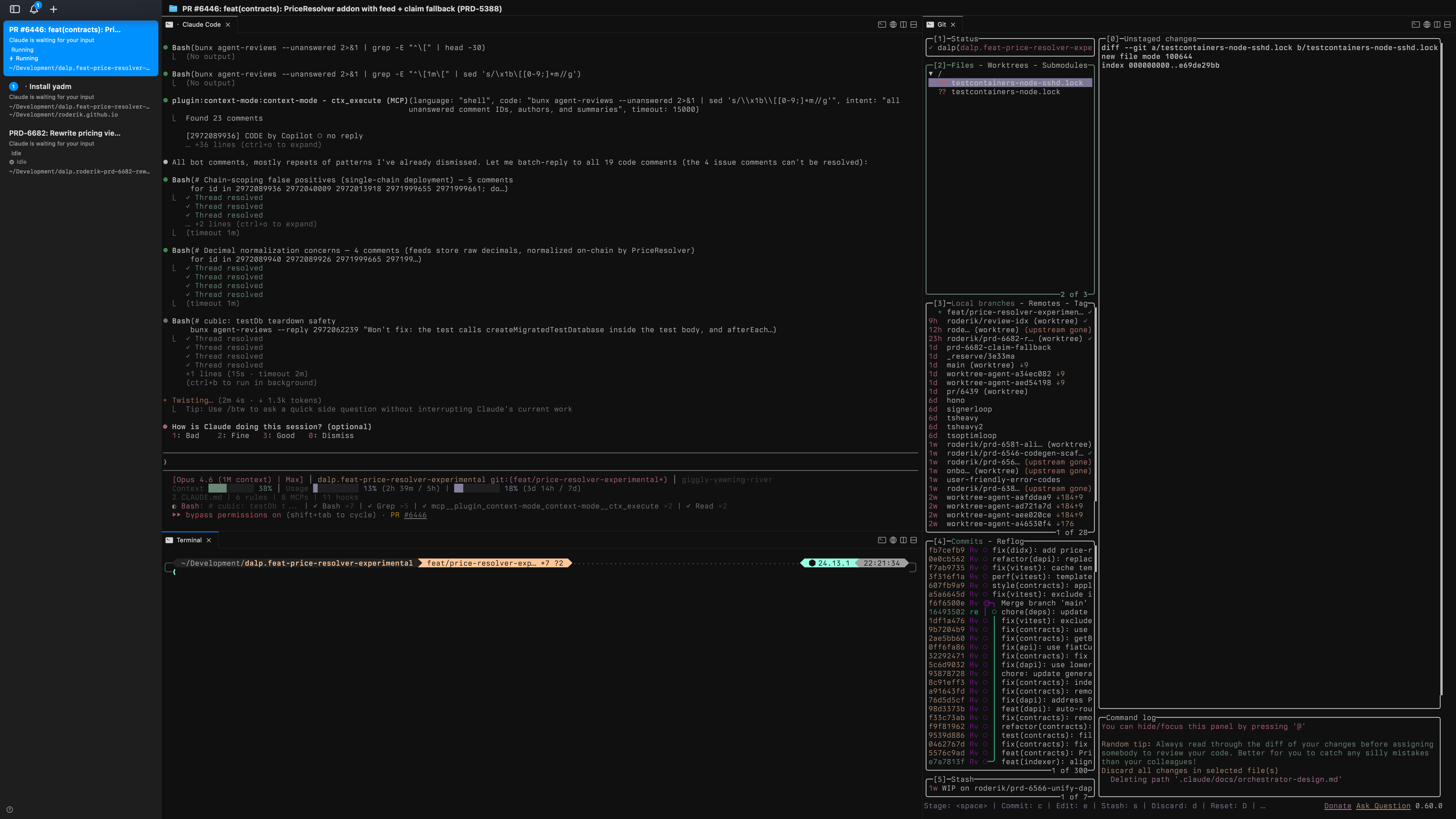
I’ve been using Claude Code as my primary development tool at SettleMint for over a year. At some point I stopped thinking about it as “an AI assistant” and started treating it as infrastructure — something that should be running, managed, and observable the same way I’d think about any other service.
This is a walkthrough of what I ended up building. It’s not a product. It’s a stack of tools, shell scripts, and markdown files held together by convention.
The thing that was annoying
Claude Code is great, but it’s a single terminal session. You’re sitting there watching it work, and if you close the lid it’s gone. I have a dozen active repos. I wanted agents running in parallel across projects without me staring at each one. I also wanted to go from a vague idea to shipped code with as few manual handoffs as possible.
There’s no off-the-shelf product that does this cleanly. So I glued things together.
cmux
The terminal layer is cmux. It’s built on libghostty and works like tmux — splits, panes, workspaces — but with a Unix socket API you can script against. The thing that matters for me: each workspace shows notification rings when an agent needs attention. I can have ten workspaces running agents and only look at the ones that ping me.
Everything is controllable over the socket: create workspaces, split panes, send keystrokes, rename tabs, resize. Which brings me to the glue.
The fish functions
The actual entry point to my workflow is a 63-line fish function called __wt_cmux_setup. When worktrunk (my git worktree manager) drops me into a project directory, this fires automatically. It detects the cmux workspace, reads the pane topology, creates a right split with lazygit, a bottom split for a spare terminal, resizes everything to sensible proportions, and launches Claude Code or Codex in the main pane. It’s idempotent — if the layout already exists, it skips. Every project gets the same three-pane setup without me touching anything.
On top of that, I have wrapper functions that tie worktrees, cmux, and agents together:
wtn PRD-1234— fetches a Linear ticket (via the Linear CLI), creates a worktree, sets up the cmux layout, and launches Claude Code with/executevia ACP. One command from ticket to agent working on it.wtg— opens an fzf picker of open PRs, checks one out as a worktree, sets up cmux. Good for jumping into shepherd on an existing PR.wtc my-feature— creates a plain worktree with a branch name and sets up cmux.wtr— removes the current worktree, cleans up the branch, prunes the remote, and closes the cmux workspace.
The fish config also has abbreviations — c expands to claude --dangerously-skip-permissions, lg to lazygit, ct to cmux claude-teams --dangerously-skip-permissions. The full shell setup is in my dotfiles repo.
ACP: managing agents remotely
The wtn function doesn’t just launch Claude Code — it launches it through ACP (Agent Control Protocol). ACP lets OpenClaw manage and steer running agent sessions. I can check on an agent’s progress, redirect its focus, or ask for a status update without needing to be in the terminal where it’s running.
Without ACP, I’d need to be in front of the specific cmux pane to do anything. With it, wtn PRD-1234 is genuinely fire-and-forget — OpenClaw keeps track of the session and I can steer it from wherever I am.
OpenClaw
OpenClaw is both a CLI and a macOS app. The app runs as a daemon — starts on boot, stays alive, connects to model providers through a local gateway. The CLI (openclaw) handles onboarding, skill management, and configuration. What it gives me is the skills directory at ~/.agents/skills/. Skills are markdown files with structured prompts. Having them at the system level means they’re available in every project without duplicating anything.
I have about 60 skills installed. Most are marketing and design related (I use the Impeccable plugin for UI work). The development-critical ones live in the project repo itself under .agents/skills/.
Context is the actual bottleneck
Something I didn’t understand until I tried running agents for hours: context fills up fast. Every shell command output, every file read, every tool result eats into the context window. Once it’s full, Claude Code compacts the conversation — summarizes everything and drops the details. After compaction, the agent gets noticeably worse. It forgets constraints, misses requirements, repeats mistakes it already fixed.
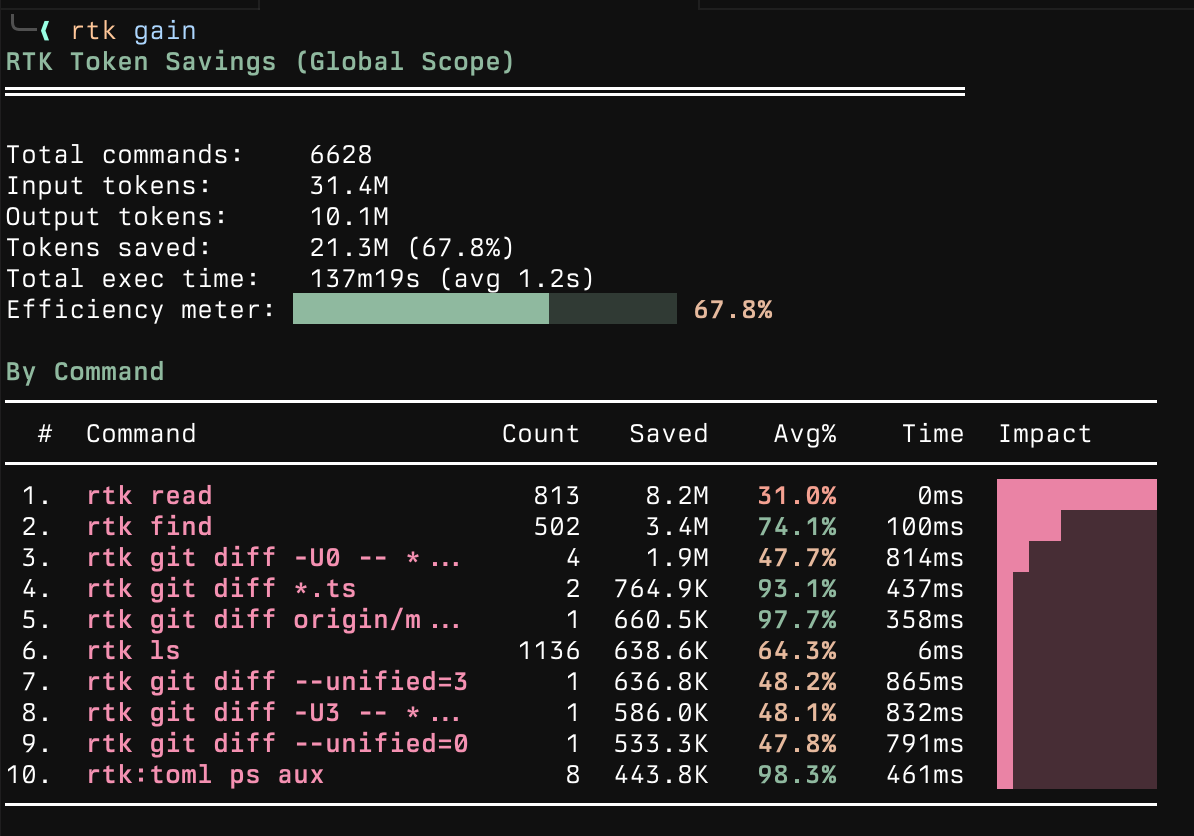
RTK (Rust Token Killer) intercepts every shell command Claude Code runs and strips the output. A git status that returns 200 lines gets compressed to the 15 that matter. It’s installed via homebrew and works transparently through hooks. I can check the actual numbers with rtk gain:
context-mode is a plugin that virtualizes the context window. Instead of dumping 500 lines of test output into the conversation, it indexes the output in an FTS5 database and lets Claude search it. The raw data never enters context. Without this, agents start losing coherence after about 45 minutes of heavy tool use. With it, they stay sharp through multi-hour sessions.
I also run claude-hud for a status line that shows how much context I’ve used:

The important number is the context percentage. Once it gets too high, compaction happens and the agent loses nuance. The whole point of RTK and context-mode is to stay in the sharp range as long as possible — it’s not about saving money (I use Max and Pro accounts), it’s about not having the agent forget what it was doing.
fff rounds out the context toolkit with fast file search that ranks results by how recently and frequently I’ve used them, and boosts git-dirty files.
From idea to Linear tickets: brainstorm
Before any code gets written, I often start with /brainstorm. It’s an orchestration skill that takes a project idea and turns it into a structured PRD in Linear, then optionally breaks it down into implementation tickets.
The flow: I describe what I want to build, it asks clarifying questions (target users, constraints, scope), then delegates to a prd-builder sub-skill that drafts a six-section PRD through a back-and-forth. The PRD gets stored directly in Linear’s project content field — Linear is the source of truth, not local files.
Once the PRD is approved, a task-builder sub-skill decomposes it into milestones and detailed tickets with descriptions, estimates, and dependencies. It can run autonomously (auto-approves drafts, picks sensible defaults) or interactively.
The output is a Linear project with everything filled in — lead, dates, initiative — and a set of tickets ready for agents to pick up. It’s the bridge between “I have an idea” and “an agent is working on it.”
Shepherd: the PR babysitter
This is the skill that changed how I work. /shepherd is a convergence loop that manages a pull request until it’s merge-ready:
- Fetches all review comments — from bots and humans
- Evaluates each one: fix it, or dismiss with reasoning
- Implements fixes with TDD, commits, pushes, replies to the comment
- Waits for review bots to finish reacting
- Checks CI, rebases if behind, resolves conflicts
- Loops back if anything changed
It stops when: zero unanswered comments AND all bots done AND CI green AND PR is mergeable AND it didn’t push any commits in the last iteration. That last condition matters — if shepherd just pushed a fix, CI needs to run again, so it waits.
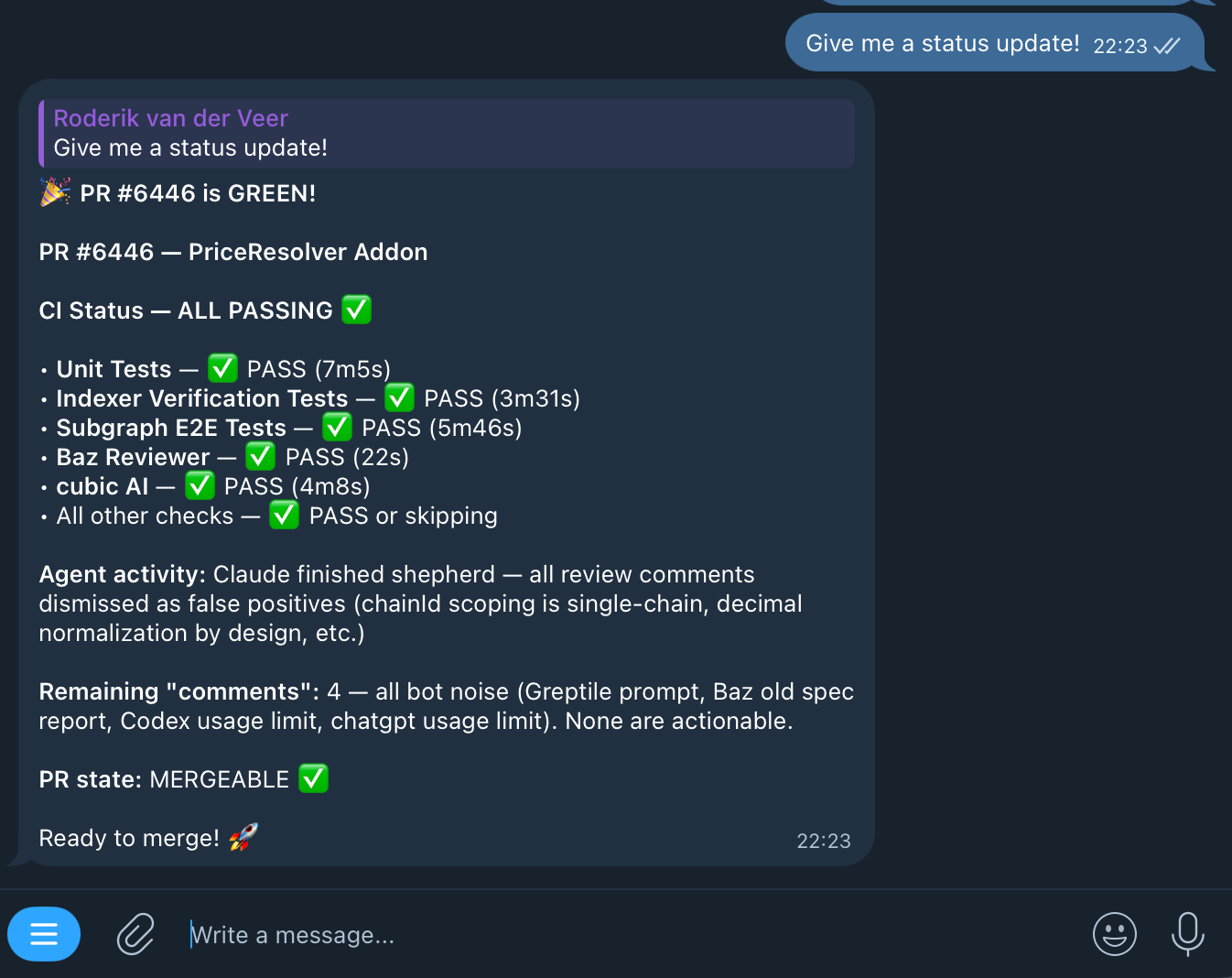
For review resolution, shepherd uses agent-reviews — a tool that fetches and resolves PR review comments from bots like Copilot, Cursor Bugbot, cubic, and Baz Reviewer. It works in two phases: a synchronous sweep of all current findings, then a polling loop that watches for new comments as bots react to fixes. It stops when the watcher reports quiet for five minutes. There’s a separate mode for human reviewer feedback that distinguishes between change requests, questions, and suggestions.
The full pipeline
Shepherd handles the PR endgame. The full flow starts with /execute, which reads a Linear ticket and routes through:
Planning — the planner does codebase research via semantic analysis and LSP, web research for unfamiliar patterns, then seven parallel reviewers tear the plan apart: feasibility, scope, security, architecture, devil’s advocate, design, and interaction. Plans that don’t survive get reworked. I review plans in Plannotator, which gives an annotation UI for agent-generated plans — I can comment on specific steps before the agent starts building.
Building — strict TDD. Each task gets fresh agent context to avoid pollution from previous work. A verifier skill runs completion checklists and the full CI tier before marking anything done.
PR + shepherd — opens the PR and hands off to shepherd.
Linear ticket to merged PR. I still check in a few times during a run, but the interventions are getting rarer.
What the day looks like now
Morning: check Linear, launch agents on priority tickets with wtn, shepherd picks up PRs from overnight. Most of my active time goes to architecture decisions, reviewing plans in Plannotator, and working on problems agents genuinely can’t handle — novel integrations, anything ambiguous, anything that needs a conversation with another human.
When I’m away from my desk, OpenClaw via ACP lets me steer agents from my phone. Telegram gives me status updates when something finishes or gets stuck.
Sometimes I start with /brainstorm to flesh out a new idea, let it produce the tickets, then /execute picks them up. The gap between “what if we…” and “it’s in review” keeps getting shorter. I’m not sure how short it can get.
Less writing code, more thinking about what to build. It took some adjusting. I’m still adjusting.
The pieces
If you want to try any of this:
- cmux — terminal multiplexer with socket API
- OpenClaw — AI gateway, skills runtime, and CLI
- My dotfiles — fish config, cmux functions, wt wrappers, Brewfile
- RTK — Rust Token Killer, keeps context clean
- context-mode — context window virtualization via FTS5
- claude-hud — status line for context usage and agent progress
- Plannotator — annotation UI for plans and code review
- Impeccable — design fluency skills
- agent-reviews — automated PR review resolution
- worktrunk — git worktree manager with shell integration
- The workflow skills — brainstorm, shepherd, execute, planner, verifier, TDD, and the completion hooks
Install the workflow skills into any project:
npx skills add roderik/roderik.github.ioThe companion installation spec has the full breakdown if you want to reproduce the entire environment.
I’m building DALP (Digital Asset Lifecycle Platform) with this stack. The skill system and agent workflows are at github.com/settlemint/agent-marketplace.